Pernithia Galnith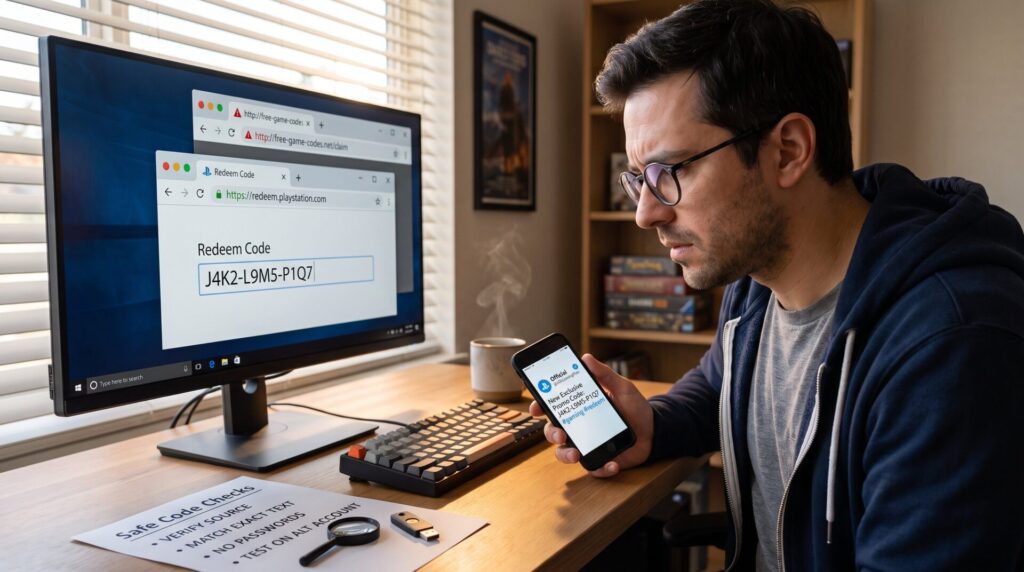
How to Check Whether a Gaming Promo Code Is Legitimate begins with a simple fact: many promo codes are real, but a hard minority are scams. Readers need fast checks they can run in seconds before entering a code. This guide gives clear, practical steps to spot authentic codes, avoid phishing pages, and safely redeem rewards without handing over passwords or payment details. It assumes the reader wants reliable, repeatable checks usable on PC, mobile, and in-app redemptions.
Key Takeaways
- Verify gaming promo codes by checking official developer or publisher websites and verified social media channels for authenticity.
- Avoid scams by scrutinizing code sources, avoiding affiliate links, and ignoring requests for passwords or payment information.
- Test promo codes safely using official redemption pages and consider using secondary accounts to prevent account compromise.
- Look for clear terms, expiration dates, and matching code text to official announcements to identify legitimate gaming promo codes.
- Be alert to red flags such as urgent language, unrealistic rewards, or unusual code formats that suggest a fraudulent promo code.
- Report suspicious promo codes to game support to help protect the gaming community from scams.
Understand Common Promo Code Types And Where They Come From
Fact up front: most legitimate gaming promo codes come from developers, publishers, verified partners, or official in-game events. Knowing the origin narrows the risk immediately.
Developers and publishers. Studios publish codes in official channels, game websites, verified Twitter/X or Instagram accounts, and in-game announcements. These codes often unlock cosmetics, currency, or time-limited boosts. For example, a mid-size publisher might issue 5,000 single-use codes after a patch: that’s a precise, trackable distribution.
Newsletters and official partners. Verified newsletters and brand partnerships also distribute codes. A reputable partner will use an exact domain and clearly state eligibility and expiration. If a code arrives by newsletter, it should match the wording on the publisher’s page.
Third-party aggregators and streamers. Aggregator sites collect codes but may not vet them. Streamers sometimes offer codes during live drops: those are legitimate only when the streamer links to an official page or the developer confirms the drop.
Code types to recognize:
- Single-use codes tied to accounts (redeem once).
- Multi-use public codes (open to many players).
- Event codes that expire quickly.
A practical test: if the code’s announcement includes a precise number (e.g., “2,500 codes for early backers”), treat that as a positive signal. If the message is vague or claims unlimited huge discounts, treat it as suspicious.
Check The Source: Official Channels Vs Third-Party
Start with this answer: verify the origin before anything else: source-checking prevents 80% of scams.
Verify on official sites and social media
Check the developer’s official website and verified social accounts first. The developer’s site often has a dedicated promo or news page listing current codes. If the social post shows a blue verification mark and links back to the game site or a known partner, the code is likely authentic. When developers post, they include exact terms, expiration, and sometimes a campaign ID, these specifics matter.
A useful habit: open the game’s official redemption page or in-app code entry screen and confirm the text of the offer matches the announcement. If the announcement mentions “redeem in settings > promo code,” it’s a clear, testable instruction.
Beware of affiliate links and impersonators
Fraudsters copy layouts and use near-identical domain names. Look for tiny spelling changes in domains, unexpected subdomains, or long redirect chains. If a code announcement asks the user to download an app from a non-official store, fill in a survey, or provide a password to “verify identity,” stop immediately.
Concrete checks to run:
- Hover or long-press links to view the real domain before clicking.
- Confirm the HTTPS padlock and certificate details for unfamiliar pages.
- Open the developer’s official page via a search engine query or from the app store listing: don’t follow a forwarded link.
If uncertainty remains, cross-check with other channels: subreddit posts, community forums, or the publisher’s support page. A verified confirmation from more than one official channel greatly reduces risk.
Verify On Official Sites And Social Media
Direct fact: the safest confirmation comes from the publisher’s site or verified social post. These pages show exact terms and let players compare wording against the code they received.
Steps to verify:
- Search the game’s official website for a promo or news section. Match the code text and expiration.
- Find the developer’s verified Twitter/X or Instagram account. Look for the post timestamp and matching campaign details.
- Check the app store or Steam news feed for an official announcement: those feeds often mirror the publisher’s site.
Example: A community manager posts a code with a screenshot of the developer dashboard and a short URL. The screenshot shows an expiry date and campaign ID. That level of detail is a strong trust signal. If the post lacks specifics, it’s weaker.
When in doubt, contact support through the official site or app. Support replies are slower but confirm legitimacy without exposing credentials.
Beware Of Affiliate Links And Impersonators
Core insight: affiliate or fake pages can look polished but still be malicious. Treat any landings that request sensitive data as hostile.
Common impersonator tactics:
- Misspelled domains like gamedevvs.com instead of gamedev.com.
- Redirect chains that end on an unrelated domain.
- Fake verification badges or copied social profiles.
Practical tests:
- Inspect the referral chain using a browser’s developer tools or a URL expander. If the link redirects through multiple domains, consider it risky.
- Check WHOIS for a recently registered domain when a “limited-time” code appears from an unknown site.
If an affiliate claims exclusivity, ask for the partner’s ID and confirm that ID on the publisher’s partner list or press page. This reduces fraud risk and reveals whether the partner relationship truly exists.
Contextual link: readers who want a deeper primer on how gaming tech and code distribution work can review a compact overview of platform mechanics in the site’s tech guide, such as this short tech primer.
Test And Inspect Codes Safely Before Claiming Rewards
Answer first: never redeem a suspicious code directly: test it in low-risk ways.
Safe testing steps:
- Use the official redemption page inside the game or on the developer site. If the site requires login, ensure the URL matches the app store or official domain.
- If the code offers an in-game item, test with a secondary account if available. A throwaway account isolates risk.
- Avoid entering codes on third-party redemption forms. If a third-party claims to “verify” a code, it may harvest credentials.
Small-scale experiment example: when a streamer offered a new skin code, one player tried it on an alt account first. The result: the code worked and the skin appeared without extra steps. That single small test prevented potential account compromise on the main account.
Red flags during testing:
- Requests for login outside the official domain.
- Extra steps like completing a survey, installing an APK, or sharing two-factor codes.
- Prompts to give credit card details to “unlock full value.”
If a code triggers unexpected behavior, capture screenshots and report to the developer’s support. Developers track malicious campaigns and often revoke compromised codes quickly.
Common Red Flags In Code Format And Terms
Key point: specific formatting and odd terms often reveal fakes. Look for visual and legal inconsistencies.
Format warning signs:
- Codes with nonstandard characters or extremely long strings that mimic generated keys.
- Claims of “unlimited 90% off” or unusually large rewards with no published limit.
- Urgent language that pressures users: “Redeem in 5 minutes or lose it.”
Terms and legal clues:
- Missing or vague expiration dates.
- No stated eligible regions or platforms.
- A requirement to submit sensitive personal data to claim the reward.
Concrete examples: a fake page once displayed a code with an extra trailing zero and asked users to verify via SMS: legitimate publishers rarely use SMS verification to redeem free in-game cosmetics. Another scam showed a low-quality JPG of a code rather than plain text: that’s often a quick social post meant to bait search engines.
Practical checklist before redeeming:
- Verify clear expiration and eligibility.
- Confirm no payment or password is requested.
- Match the code text exactly with the publisher announcement.
If a code fails these checks, skip it. Reporting suspicious offers to the game’s support helps protect other players.
Conclusion
A reliable gaming promo code is confirmed by the developer or a verified partner, matches official wording and terms, and redeems without extra personal-data steps. Players should source codes from official channels, verify domains and announcements, and test on low-risk accounts. Honest mistakes happen, report unclear offers and educate friends so fewer people fall for scams.